Quick reference
LinkedIn comment character limit (2026)
LinkedIn comments can be up to 1,250 characters. See every LinkedIn character limit for 2026, what counts as a character, and how long a comment should really be.

The short answer
A LinkedIn comment can be up to 1,250 characters, including spaces, punctuation, line breaks and emoji. Replies to comments have the same limit. The comments that get noticed are usually far shorter: two to four sentences, or roughly 150 to 400 characters.
LinkedIn doesn't show a character counter on comments. You only find the limit when the box stops accepting text. That's rare, because most comments never get close. But it helps to know the number, and it helps more to know how long a comment should be if you want the author, and their audience, to notice you.
Every LinkedIn character limit at a glance
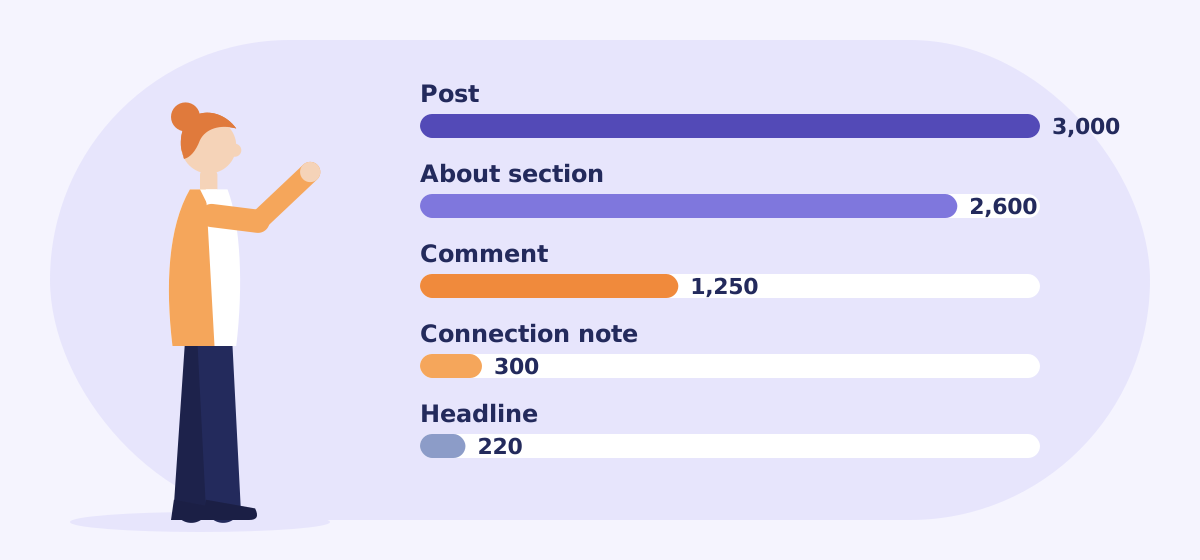
These are the limits LinkedIn's editor enforces as of November 2026. LinkedIn doesn't publish all of them in one place, and it changes some of them from time to time, so treat the less common ones as a guide.
| Where you're writing | Character limit |
|---|---|
| Comment, or reply to a comment | 1,250 |
| Post | 3,000 |
| Profile headline | 220 |
| About section | 2,600 |
| Connection request note | 200 on free accounts, 300 on Premium |
| Article | About 110,000 |
| Threads post or reply (for comparison) | 500 |
Two more numbers matter even though they aren't limits. A post is cut off with "…see more" after roughly 210 characters on desktop and about 140 on mobile, so the opening line does most of the work. Long comments are also collapsed after a few lines, so anything important belongs at the start of your comment too.
What counts as a character
- Spaces and line breaks count. A blank line between paragraphs uses characters, just like a word.
- Mentions count as the name. When you @mention someone, the full name that appears in your comment counts towards the limit.
- Hashtags count, including the # sign. In comments, they rarely help anyway.
- Some emoji count as two. Emoji are stored in a way that can use more than one character each, so a row of them uses more space than it looks.
- Links count in full. LinkedIn may shorten how a link looks, but plan for the full address.
How long should a LinkedIn comment be?
Long enough to add something, and short enough to read in a few seconds. For most posts that means one clear point, made in two to four sentences. A useful shape is:
- Pick out something specific from the post, so it's obvious you read it.
- Add one thing: your own experience, a number, an example or a respectful counterpoint.
- Optionally, ask a real question that the author would enjoy answering.
Gets ignored
"Great post, thanks for sharing! 👏"
Gets a reply
"The point about answering one question per page matches what we saw: our comparison pages were cited in AI answers within weeks, our long guides weren't. Did you find length mattered, or just focus?"
The second comment is about 230 characters, under a fifth of the limit. It's specific, it adds a result, and it invites the author into a conversation. That's what makes people click through to your profile, which is the point if you're using LinkedIn for prospecting. It's also something no AI comment tool can write for you: see why your own words beat AI comments.
What to do if you hit 1,250 characters
- Cut the warm-up. Openers like "Such an important topic, and one I've been thinking about a lot" can go. Start with your point.
- Keep one idea. If you have three, choose the one the author is most likely to respond to.
- Turn it into a post. If you genuinely need more than 1,250 characters, you have a post of your own. Write it, and credit the person who sparked it.
- Avoid splitting a comment across replies. A chain of replies to yourself reads as a lecture in someone else's comments.
Writing better comments, faster
Replydex is a free Chrome extension that finds recent LinkedIn and Threads posts on the topics your prospects care about, and opens each one with the comment box ready. If you add your own Claude API key, it can also suggest three short drafts in your style, which you edit and post yourself. Drafts stay well inside the limits: short by default on LinkedIn, and always under 500 characters on Threads.
Frequently asked questions
Is the character limit the same for replies to comments?
Yes. A reply to a comment is itself a comment, so it has the same 1,250-character limit.
Does LinkedIn show a character counter on comments?
No. Posts don't show a running counter either until you get close to the limit. If you're writing something long, draft it somewhere that counts characters first.
Can I edit a LinkedIn comment after posting it?
Yes. Open the three-dot menu on your comment and choose Edit. The 1,250-character limit still applies to the edited version.
What's the character limit on Threads?
Threads posts and replies can be up to 500 characters, well under half of a LinkedIn comment.