Opinion and how-to
AI LinkedIn comments: why your own words win (and fight AI slop)
Should you use AI to write LinkedIn comments? Why comments in your own words get replies, what LinkedIn says about automated comments, how to spot AI slop, and where AI can still help.
The short answer
Write your LinkedIn and Threads comments in your own words. AI-written comments tend to sound generic, add nothing the post didn't already say, and are easy to spot, so they rarely get replies. LinkedIn doesn't allow automated comments posted by browser extensions, scripts or third-party tools, and it limits their reach. AI can help you find posts or check your writing, but the comment itself should be yours: one specific point from your own experience. Every genuine comment also makes the feed a little less full of AI slop.
Open the comments under almost any popular LinkedIn post and you'll see them: "Great insights! This really resonates." "Such a powerful reminder of the importance of authenticity." "Thanks for sharing, what are your thoughts on the future of this?" They arrive within seconds, they could sit under any post, and nobody answers them.
That's AI slop, and it has become common enough to have a name. Australia's Macquarie Dictionary chose "AI slop" as its 2025 Word of the Year, defining it as low-quality content created by generative AI. This guide explains why that matters if you use comments to build relationships, and how to make sure yours stand out for the right reasons.
What AI slop looks like in LinkedIn comments
AI-generated comments share a few tells. One on its own proves nothing, but together they're easy to recognise:
- Restating the post. The comment summarises what the author just said, then agrees with it.
- Praise with no detail. "Insightful", "powerful", "game-changer", "resonates", with nothing to show the commenter read past the first line.
- The generic question. "What are your thoughts on…?" attached to the end, inviting the author to do all the work.
- Polished but empty structure. Neat lists of three, a dash-separated aside, a closing flourish. Correct, smooth and saying nothing.
- Impossible speed. A long, tidy comment on a 1,000-word post, seconds after it went up.
- The same voice everywhere. Click through to the commenter's activity and every comment, on every topic, has the same shape.
It isn't only comments. Originality.ai, which sells AI-detection software, estimated that 54% of long-form English LinkedIn posts it analysed in late 2024 were likely AI-generated, and its later samples have reported higher figures. Detection tools aren't perfect, so treat those numbers as estimates, but anyone who reads LinkedIn daily has felt the change.
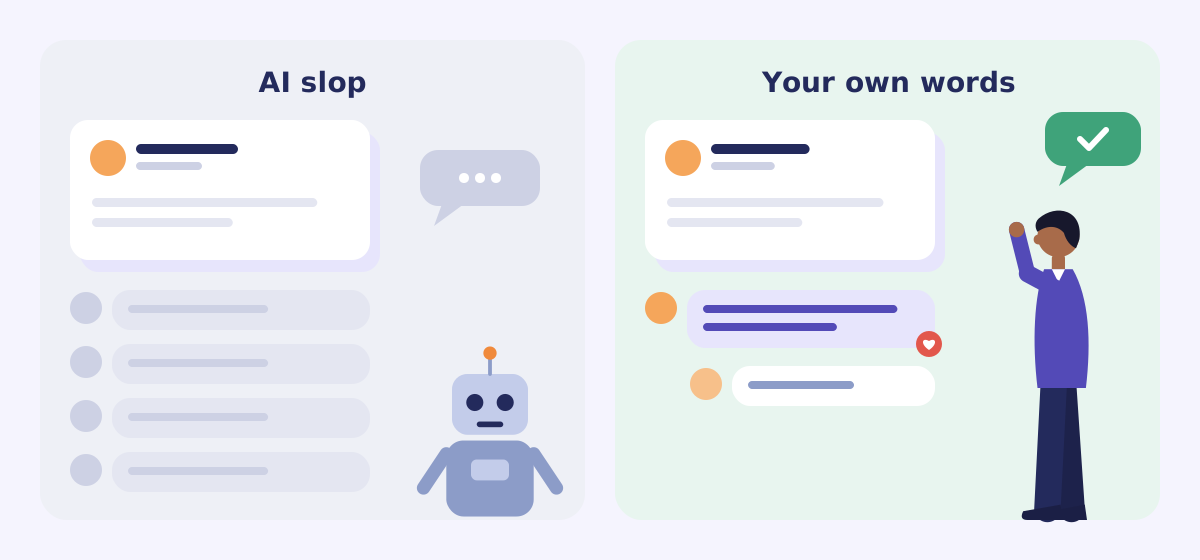
AI slop
"Great insights! Pricing is such a crucial aspect of building a successful business. Thanks for sharing these valuable lessons. What are your thoughts on the future of pricing?"
Your own words
"Your point about anchoring with the top tier first matched what happened when we redid our consulting packages: almost nobody picked the top one, but the middle one doubled. Did you test the order, or just the prices?"
Why your own words matter more than ever
If you comment to prospect on LinkedIn, every comment is a first impression. The author, and often your future client, decides in one read whether you're a peer worth knowing or another bot in the thread.
- Specific detail proves you read it. Quoting the one line that made you think is the fastest way to show attention, and attention is what people notice.
- Experience can't be generated. An AI can rephrase the post. Only you know what happened when you tried it, which client pushed back, or where you disagree. That's the part worth reading.
- People check your profile. A good comment earns a click. If your activity page is fifty identical comments, the click ends there.
- Your voice has to match you. If a comment sounds nothing like you on a call, the relationship starts on a false note.
- Scarcity makes it stand out. When most comments sound machine-made, a plainly human one gets noticed, and gets the reply.
What LinkedIn says about automated and AI comments
In March 2026 LinkedIn published a post on authentic content and conversations. It says comments posted using a browser extension, script or third-party tool are automated comments, and that they aren't allowed on LinkedIn. It also says LinkedIn limits the reach of inauthentic activity, and that detected automated comments may not appear in the "Most Relevant" view, which is the one most people see.
LinkedIn's User Agreement has long prohibited using bots or other automated methods to add contacts, send messages, or create, comment on or like posts. So "LinkedIn auto comment" tools that post for you carry a real risk to your account, on top of the reputational one.
LinkedIn hasn't banned using AI to help you write. Its rules target automation: software acting for you. But a comment that a tool wrote and you pasted unchanged reads exactly like one a bot posted, and people judge what they read, not how it was made.
Threads has a similar line. It runs under Instagram's terms and community guidelines, which ask people not to artificially collect likes, followers or shares.
How your own comments help fight AI slop
No single comment fixes the feed. But the feed is built from what people reward, and comments are one of the strongest signals there is.
- You reward real writers. A thoughtful reply tells the author that writing it themselves was worth it.
- You raise the bar in the thread. One specific, human comment makes the generic ones around it look as empty as they are, and invites better replies.
- You give the ranking something real to work with. LinkedIn says it's working to show more relevant, authentic professional content. Genuine conversations are exactly what that's meant to surface.
- You keep your network human. The people you comment with become the people whose posts you see. Genuine comments build a feed of genuine people.
Where AI can help without writing for you
Using your own words doesn't mean refusing all help. The line is simple: tools can find, check and suggest; you decide what you say, and you post it.
| Fine to use AI for | Leave to yourself |
|---|---|
| Finding fresh posts on your topics | Deciding which conversations are worth joining |
| Summarising a long linked article before you read the key part | Commenting on anything you haven't actually read |
| Checking spelling and grammar in what you wrote | Rewriting your comment into polished, generic prose |
| Suggesting an angle you then rewrite in your own words | Pasting a draft unchanged |
| Translating a post written in another language | Claiming experience, results or opinions you don't have |
| Opening the post with the comment box ready | Clicking Post, and every like, follow and message |
How to write a comment in your own words in 60 seconds
- Read the whole post. Including the part after "see more". Most slop is written from the first two lines.
- Pick one line. The one that surprised you, matched your experience, or that you disagree with.
- Add one thing only you know. A number, a client story (anonymised), a mistake you made, or a respectful "here's where I'd push back".
- End with a real question, or don't. Ask something you'd genuinely like answered. If you have nothing to ask, just stop.
- Read it aloud. Would you say it to this person over coffee? If not, change it until you would.
Most good comments land between 150 and 400 characters, well under LinkedIn's 1,250-character comment limit.
Where Replydex fits
We built Replydex around this idea. It does the part that doesn't need your voice: searching LinkedIn and Threads for fresh posts on your topics, skipping the ones you've already commented on or liked, and opening each one with the comment box ready. It never posts, comments, likes, follows or messages anyone.
Replydex can also suggest an AI draft, but only if you choose to add your own Claude API key. We treat drafts as a prompt to think, not a comment to paste: you edit it, make it yours, and you click Post. If you'd rather never see a draft, don't add a key and you won't.
Frequently asked questions
Is it against LinkedIn's rules to use AI to write comments?
LinkedIn's rules target automation. Comments posted by a browser extension, script or third-party tool aren't allowed. Using AI to help you think or check your writing isn't banned, but you should post the comment yourself, and it should say what you actually think.
Can LinkedIn detect AI-generated comments?
LinkedIn says it uses technology and human review to detect automated comments, and may limit their reach. It hasn't said it penalises AI-assisted writing as such. The bigger risk is people: generic AI comments are easy to recognise, and they quietly cost you credibility.
Are LinkedIn auto comment tools safe?
No. Tools that post comments for you are automated commenting, which LinkedIn doesn't allow, and accounts that automate can be restricted. They also produce exactly the kind of comments people now ignore.
Should I use a LinkedIn comment generator?
Only as a starting point, if at all. If a generator suggests an angle, rewrite it with your own detail and voice before posting. If you'd post the suggestion unchanged, it isn't adding anything the author will value.